
Restaurant Franchise Financial Reporting: A Practical Guide for Owners
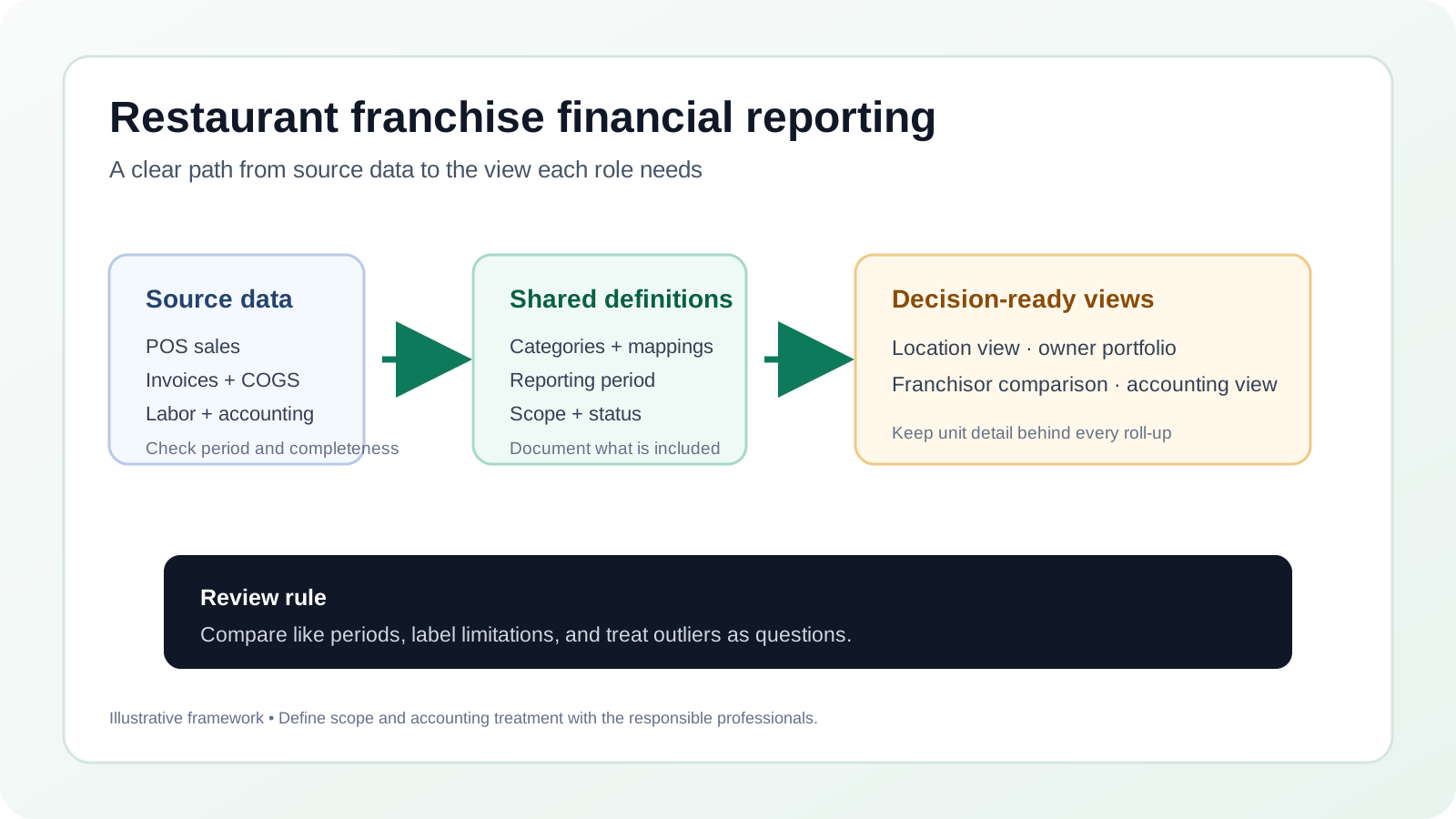
Learn how to standardize franchise reports, compare locations, track budgets, and set clear reporting roles without confusing unit and consolidated results.
Restaurant franchise financial reporting helps owners and franchisors understand what is happening at each location and how the group is performing overall. The challenge is not simply collecting more numbers. It is making sure units use comparable definitions, reports arrive on a useful schedule, and each person can see the information they need without mixing separate businesses or responsibilities.
A useful reporting approach starts with a shared structure, then preserves the differences that matter between locations. A franchisor may need a portfolio-level view of sales and operating trends. A franchise owner needs practical information for running their own restaurants. A restaurant manager needs timely unit-level signals and clear follow-up actions. Those are related needs, but they are not the same report.
This guide explains how to set reporting boundaries, standardize categories, compare units fairly, review budget variances, and assign responsibilities. It is operational guidance, not legal, tax, or guaranteed performance advice. Franchise agreements, accounting policies, and professional advisors should determine formal reporting obligations and accounting treatment.
What Does Restaurant Franchise Financial Reporting Include?
Franchise financial reporting is the organized presentation of financial and operating information for individual restaurant units and, where appropriate, a wider group. It commonly combines sales information, cost categories, labor costs, expenses, budget comparisons, and accounting records. The exact contents depend on who is preparing the report and why it is being reviewed.
A helpful way to think about it is as several connected views, rather than one universal dashboard:
- Location view: The financial activity for one restaurant, with enough detail for its operator to understand what changed and what may need attention.
- Owner view: A view across the locations owned by one franchisee, while retaining the ability to examine each unit separately.
- Franchisor or system view: A carefully defined set of comparable information across participating locations, subject to the reporting permissions and data available to the franchisor.
- Accounting view: The records and statements maintained under the applicable accounting process for the legal entity or entities involved.
These views answer different questions. A franchisor might want to see whether reported sales trends are moving similarly across regions. An owner may need to investigate a labor-cost variance at one store. An accountant may need to reconcile transactions and maintain the books. A report becomes confusing when it does not explain which question it answers, whose data it contains, and what period it covers.
Before building a report, write down its audience and purpose. For example: “This monthly owner report compares the three restaurants owned by the same franchisee, using each location’s approved monthly results.” That sentence defines a narrower and more useful report than “show franchise performance.”
The word “financial” can also refer to different levels of completion. An operational report might organize sales and costs so a manager can spot a developing question. A bookkeeping report might reflect categorized transactions that still need review. A financial statement is prepared through an accounting process and should be described according to that work. Avoid using these labels interchangeably. If a view is preliminary or managerial, say so plainly.
A useful report also explains what action it supports. A daily view may help an operator decide which inputs to check or where to ask a question. A monthly owner package may support a broader review of actual performance against a plan. A franchisor comparison may help identify systemwide patterns for discussion. If readers cannot name a decision or follow-up the report informs, remove unnecessary detail or clarify the purpose before expanding it.
How Should Franchise Reporting Boundaries Be Set?
Consolidation is one of the most important boundaries to define. In everyday conversation, people may use “the group” to describe a brand, a group of franchisees, or a single owner’s portfolio. Those terms can hide important distinctions. A franchise system is not automatically one accounting entity, and a system-wide comparison should not be presented as though it were a consolidated financial statement.
Identify the unit of analysis before combining numbers. Is the report about a single restaurant, one franchisee’s locations, a region, or a wider system? State whether each figure is a location result, an owner-level aggregation, or a system-level summary. Preserve the underlying unit detail so that a total can be traced back to the locations and periods that contributed to it.
Aggregation needs a documented rule. If an owner operates several locations, decide whether the report sums the same line items across those locations, presents each location side by side, or does both. A sum can answer questions about the owner’s overall scale, but it can conceal substantial differences between units. A side-by-side view helps diagnose variation, but it does not by itself explain why the difference exists.
Similarly, a franchisor-facing report may summarize measures that are suitable for comparison without implying ownership of franchisee financial records. Confirm who is authorized to access each data set, what information is shared, and whether definitions and reporting periods are consistent. A platform or dashboard does not decide these governance questions. Document them with the appropriate business, accounting, and legal advisors.
Keep these boundaries visible in the report
- Entity: Identify the legal entity or operational unit represented, as established by the organization’s accounting process.
- Location: Use a stable location identifier and an agreed display name. Names alone may change or be duplicated.
- Period: Show the start and end dates, the reporting basis, and whether the period is complete or still provisional.
- Scope: State which restaurants, channels, or categories are included and what is excluded.
- Currency and units: Use consistent currency, rounding, and measurement conventions when combining information.
- Status: Mark preliminary, adjusted, or finalized information clearly, and explain how later revisions are handled.
For instance, a monthly owner summary might show four locations in separate columns and an owner total in a final column. The report should not imply that the total eliminates intercompany activity, creates a formal consolidated statement, or reflects a specific accounting treatment unless that work has actually been performed. Use language that accurately describes what the report is.
Write a one-page scope note before configuring a recurring report. Include the report name, intended readers, unit of analysis, included locations, excluded items, reporting period, source systems, access rules, and person responsible for approving the definition. A plain-language note helps a new owner or staff member understand the report without relying on the memory of the person who built it.
For each aggregation, decide what happens when data is missing. If three of four locations report complete information, should the group view show a partial total, suppress the total, or display it with a visible warning? There is no universal answer. The key is to make the rule consistent, explain it near the figures, and avoid presenting a partial sum as though every unit contributed.
Acquisitions, closures, ownership changes, and temporary operating interruptions require particular care. A newly added location may not have a comparable full-period history. A location transferred between owners may belong in different owner-level views before and after the transfer. A closed location may still have expenses or final transactions in a period. Note the relevant event and apply the organization’s agreed inclusion rule rather than silently changing the comparison population.
It can be helpful to maintain two labels for a multi-unit view: the reporting group and the reporting basis. “Owner portfolio, locations A through D, monthly management view” is more informative than “company P&L.” A label does not replace accounting work, but it helps users avoid treating an operational roll-up as a different kind of statement.
Which Categories Should Be Standardized Across Locations?
Standard categories make comparisons possible. If one location records a cost as supplies and another places the same type of cost in a different category, the apparent difference may reflect classification rather than operations. A shared chart of accounts or mapping framework gives teams a common starting point for recording and reviewing activity.
Standardization does not mean that every restaurant has identical operations or every transaction has an identical explanation. The goal is to agree on a consistent reporting structure, provide a way to handle exceptions, and avoid silent reclassification. Work with the accounting professional responsible for the books to determine the formal chart of accounts and bookkeeping rules. The operating report can map data to useful categories, but should not replace accounting judgment.
At minimum, agree on how the report identifies these broad areas:
- Sales: Define the sales measure being used, its source, and the treatment of discounts, refunds, taxes, delivery fees, and other relevant adjustments. Do not compare gross sales in one unit with a net sales measure in another.
- Cost of goods sold: Specify the categories included and the period they represent. A rolling or operational COGS view and an inventory-adjusted accounting figure can differ. Label the basis rather than treating them as interchangeable.
- Labor: Define which labor expenses are included, how payroll periods align with the reporting calendar, and whether the figure is complete. Differences in inclusion can distort comparisons.
- Occupancy and other operating expenses: Use consistent category labels and clarify how recurring, one-time, or shared expenses are handled in management reporting.
- Prime cost: If the report shows prime cost, define the components and sales denominator used. For a common operating view, food cost and labor cost are examined together, but the exact calculation should be stated.
- Budget: Identify the approved budget version, time period, location scope, and whether the comparison is against the original or a formally revised budget.
A mapping table can help administrators maintain consistency across point-of-sale, invoice, payroll, and accounting data. It should show the source field, destination category, accountable reviewer, and any exceptions. When a mapping changes, note the effective date. Otherwise, a location may appear to improve or worsen simply because a category definition changed midyear.
Data completeness matters as much as the category names. A sales feed may arrive promptly while an invoice or payroll file is still missing. Mark what is present, what is estimated or provisional, and what is still outstanding. Do not make a partially populated period look final. For more on combining restaurant sales data with financial workflows, see restaurant POS data processing and the available accounting integrations.
Build definitions that survive turnover
A category dictionary should explain both the label and the practical rule for using it. “Payroll” alone may not tell a preparer whether employer taxes or benefits belong in the figure. A usable definition names included data, exclusions, source, timing, and the person or role responsible for resolving an unusual item. Keep the language concise enough that a busy operator can find the answer during the workday.
For each measure, record its calculation in words and, where appropriate, as a formula. If a report displays labor as a percentage, state the labor inputs and the sales denominator. If the two measures use different period cutoffs, make that limitation visible. A percentage can look precise even when its inputs do not line up, so clarity about timing is as important as clarity about arithmetic.
Use examples to settle ambiguous cases. Suppose a transaction could be viewed as a delivery-related charge, a sales adjustment, or an operating expense. The dictionary should point staff to the agreed treatment or escalation path, not leave each location to choose independently. Examples do not cover every transaction, but they give reviewers a consistent starting point and help expose unclear rules before they affect many reports.
Keep the original source description when a mapped item is unusual. A management category can simplify comparison, while a source-level description helps a reviewer understand what was actually submitted. Do not discard traceability simply to make the summary cleaner. When a mapping cannot confidently place an item, flag it for review rather than forcing it into a category without explanation.
Coordinate period cutoffs between inputs
Restaurant operating data may arrive on different schedules. POS activity can be available before an invoice batch is processed. Payroll records may follow a pay cycle that does not match a calendar month. A report can still be useful with those differences, but its reporting basis should explain them. State whether a cost is included based on transaction date, invoice date, service date, posting date, or another documented method.
When the reporting period closes, make a checklist of expected inputs and their status. For example, the preparer can confirm that daily sales records are present for all open days, invoice documents received by cutoff have been processed, and the designated payroll information covers the stated dates. This is not a guarantee that every figure is final. It is a repeatable way to identify what remains incomplete and assign follow-up.
Do not quietly substitute one period for another to make reports line up. If payroll spans two reporting periods, the accounting or reporting process should determine how it is presented. If an invoice arrives late, record the timing issue and follow the established adjustment process. Clear, consistent labels make it possible to compare periods while preserving the limits of the underlying data.
How Can Owners Compare Franchise Locations Fairly?
Comparing locations can reveal questions worth investigating, but a ranking alone rarely explains performance. A store with higher sales may also have a different operating schedule, local demand pattern, physical footprint, service mix, or stage of operation. Before interpreting a gap as an execution issue, confirm that the locations are being measured on the same basis and consider relevant context.
Start with comparable periods. Check that the reporting windows align and that one location is not missing a late-arriving payroll or invoice file. Consider whether each unit was open for the full period. Where operations differ, label the difference instead of forcing the numbers into a misleading comparison. The purpose is to identify useful questions, not to pretend that all restaurants are identical.
Choose comparison measures that match the decision. A total-dollar view may help an owner understand the overall portfolio, while percentage measures can add context about costs relative to sales. Neither view should stand alone. Percentages can move sharply when sales are low, and totals can obscure the scale of a location. Show the underlying measure and denominator so users can interpret the result.
For example, an operator reviewing labor cost may see that one unit’s labor share of sales differs from another’s. That is a prompt to check schedules, hours, sales mix, payroll timing, and data completeness. It is not, by itself, proof of a staffing problem or a recommended reduction. Decisions should account for service needs, local circumstances, and the operator’s own judgment.
Use a compact comparison set rather than packing every available measure onto one screen. A useful location comparison might include:
- Reporting period and whether the period is complete.
- Sales on a clearly stated basis.
- Food cost and labor cost, with definitions and corresponding sales context.
- Prime cost, if the inputs are sufficiently complete and the calculation is defined.
- Budget-to-actual results for selected categories.
- Notes that explain material operational changes or data limitations.
Allow users to move from summary to detail. A portfolio total should be traceable to location results; a location result should be traceable to its categories and supporting workflow. That traceability helps distinguish a real operating change from a posting, timing, or classification issue.
Review outliers as questions, not verdicts. Ask whether a change is sustained or isolated, whether the period is comparable, whether a data feed changed, and whether the location experienced a documented operational event. Then assign a follow-up owner and a review date. Avoid making broad conclusions from a single period or presenting a comparison as a promise of future results.
Use a repeatable comparison sequence
A fair comparison starts before a chart is built. First define the group of locations and the period. Then check whether each included restaurant was operating during the entire period, or whether an opening, closure, renovation, or other disruption affected its results. Next confirm that data completeness and category definitions are comparable. Only then choose measures and interpret differences.
- Confirm the population. Write down which locations are included and why. If a unit is excluded because it lacks a complete period, record that decision rather than leaving its absence unexplained.
- Align the dates. Make sure periods use the same start and end dates or clearly state why they differ. Check for late entries and payroll timing differences.
- Check denominators. When comparing a rate or percentage, confirm that the denominator means the same thing for every location. Display the amount as well as the ratio.
- Separate signal from context. Note known changes in operating hours, service mix, staffing structure, or other circumstances relevant to interpreting the period.
- Choose a question. Decide whether the comparison is meant to identify a follow-up, monitor a plan, or summarize a portfolio. Avoid turning a descriptive view into an unsupported judgment.
- Document the next step. Record who will review a notable difference, what they will check, and when the group will revisit it.
Consider a hypothetical two-unit owner. One location has a higher total labor amount, while the other has a higher labor share of sales. Looking at total dollars alone might point toward the first unit; looking only at percentages might make the second appear unusual. A useful review puts sales, labor dollars, the labor definition, payroll period, and operating context side by side. The report identifies a question; the operator gathers the information needed to explain it.
Another example is a food-cost figure that appears unusually low for one restaurant. Before treating it as a positive result, check whether invoices for the entire period were received and categorized, whether the measure is a rolling operational view or an inventory-adjusted accounting figure, and whether the sales denominator uses the same basis as other units. A missing input or different method can create an attractive-looking but non-comparable number.
Use caution when ordering locations from highest to lowest. A leaderboard can invite readers to infer that the first location is best and the last is worst, even when the difference is small or the data is incomplete. If ordering is useful for a defined purpose, name the measure, show the period, disclose missing data, and explain that the display does not diagnose causes. A range or side-by-side comparison may be more appropriate where rank adds no decision value.
Trend comparisons can be more useful than a single-period snapshot, provided the basis remains consistent. Show whether each point represents a complete period and mark changes in data definitions, ownership, or operations. If a category was mapped differently for part of the history, avoid drawing a continuous line that suggests the underlying measure stayed the same. Add a note or display a break where the basis changed.
Do not assume a system average represents every unit’s appropriate target. A group average describes the group under its stated scope; it does not automatically establish a target for a particular restaurant. Use budgets, operating plans, and relevant context for target-setting. If a system view is used in a conversation with operators, explain how it was assembled and allow the location-level detail to be reviewed appropriately.
How Should Budget Versus Actual Reporting Work?
A budget comparison is useful only when everyone knows which budget is being used and what the variance means. A report should show actual results, the relevant budget, and the difference in a format that fits the decision. If the budget is revised, retain a clear record of the revision and its approval rather than overwriting the original without explanation.
Decide whether the review uses dollar variance, percentage variance, or both. A dollar difference gives the absolute size of the gap. A percentage can help compare categories of different sizes, but a small base can make a percentage appear dramatic. Display enough context to avoid treating either measure as self-explanatory.
For each variance, ask a consistent set of questions:
- Is the information complete? Confirm that sales and cost inputs cover the same period and that expected data has arrived.
- Is the comparison aligned? Check that actuals and budget share the same category definitions, period, and location scope.
- What changed? Identify whether the difference comes from a known operational event, a timing difference, a classification issue, or an unexplained movement.
- Who can act? Assign the next step to the person with the relevant authority and information.
- When will it be revisited? Set a follow-up point and record the explanation or action so the same question does not restart from zero.
A simple variance log can prevent reports from becoming passive scorecards. Include the period, location, category, amount or measure, explanation, assigned owner, and next review date. Keep the explanation concise and factual. “Invoice batch received after report cutoff; review next close” is more useful than a vague label such as “bad cost control.”
Budget information should support decisions, not replace them. A variance can be appropriate, planned, temporary, or caused by incomplete information. Likewise, a result close to budget does not automatically mean the operation is healthy. Interpret the figures alongside the operating context and the quality of the underlying data.
For teams that want to organize targets and compare actuals with plans, explore restaurant budgeting tools. Define the approval process and ownership of budgets separately from the software used to present them.
Separate the variance calculation from its explanation
Choose a sign convention and use it consistently. A report might show actual minus budget, or budget minus actual, but readers should not have to guess what a positive number means. Add a short label such as “over budget” or “under plan” where that wording is appropriate. If some categories are favorable in one direction and unfavorable in another, do not rely on plus and minus signs alone.
Use both amount and percentage when they answer different questions. For example, an owner may want to know the absolute size of a gap for cash planning and its relative size for comparing categories. A small expense can show a large percentage movement from a small base. A larger category can have a modest percentage but a substantial dollar difference. Displaying both, with the budget and actual values, reduces the chance that a single presentation choice will dominate interpretation.
Distinguish a variance from a cause. The arithmetic tells the reader how far actual results differ from the chosen budget. It does not establish why. The explanation might involve timing, a change in activity, a one-time event, a source-data issue, or an assumption that no longer fits. Record what is known and what remains to be checked. Avoid assigning blame based only on the size or direction of a number.
Set a materiality rule for follow-up if the organization finds one helpful. The rule might consider a dollar amount, a percentage, repeated movement across periods, or a combination. It should be a prioritization aid, not a substitute for judgment: a small difference may matter if it repeats or signals a data problem, while a large planned variance may not require corrective action. Document the rule and revisit it when reporting needs change.
Keep budget versions and assumptions understandable
Save the approved version and identify it in the report. If an owner adopts a revised plan, preserve the original and label the revision with its date, scope, and approval status. Comparing current actuals to an undocumented, overwritten target makes it difficult to understand what was originally planned and why the comparison changed.
A budget is built from assumptions. A useful review can ask whether the assumptions remain relevant, but should not edit them silently to make results appear closer to plan. Record approved changes and the period when they take effect. When a plan is being used as an operating guide rather than a formal accounting record, say so; this prevents the report from implying that the budget has a different status than it does.
Where the same budget categories are not appropriate for every location, preserve a common top-level structure and document approved local variations. The aim is not to force a unit into a category that does not reflect its operation. It is to make legitimate differences visible and keep the comparable portions of the report consistent.
What Reporting Cadence Works for Each Role?
Different roles need information at different speeds and levels of detail. A single monthly package may be appropriate for a formal accounting review but too slow for an operator deciding what to investigate during the week. A daily view may help surface changes quickly, but it does not eliminate the need to reconcile, review, and close accounting periods appropriately.
Restaurant managers benefit from a focused operating view that shows the current period, the key measures they can influence, and any data that is not complete. Keep the presentation simple. A long report delivered frequently can create noise if there is no clear action or if users cannot tell which information is provisional.
Franchise owners often need both a portfolio overview and a drill-down into each restaurant. The overview helps them identify where a conversation or review may be needed. The unit view supports investigation and follow-through. Owners should be able to distinguish a change in one location from a group-wide movement.
Franchisors may need defined reporting that supports their agreed operational process and appropriate visibility across units. The scope and access should match applicable agreements and internal policies. System comparisons should use consistent definitions, note missing information, and avoid suggesting that a simple report is a substitute for an audit or formal financial statement.
Bookkeepers and financial teams need clear source records, dependable category mapping, exception handling, and a way to identify missing documents or mismatches. Their work may connect operational information to the accounting system, but operational dashboards should not be mistaken for a completed close.
Set a reporting calendar and clarify cutoffs. Specify when sales data is expected, when invoice and payroll information is available, when a preliminary view is produced, and when a period is reviewed or finalized. The exact calendar should fit the restaurant’s processes and advisors’ requirements. A known delay is easier to manage than an unexplained change in report timing.
Restaurant teams that need to examine operating results between formal close cycles can learn about daily P&L and real-time KPI reporting. Daily visibility is a management aid; it does not turn preliminary data into finalized books or guarantee a particular result.
Match frequency to the decision, not just the data feed
A source that updates frequently does not mean every audience needs to review every update. Decide whether the relevant user needs an alert, a daily snapshot, a weekly discussion, or a monthly package. A frequent feed can support timely awareness, while a consistent review schedule helps people distinguish a short-term fluctuation from an item that merits investigation.
For an operating review, define what should happen when a measure changes. Does the manager verify that the data is present? Does an owner compare the movement with a plan? Is an accounting reviewer expected to resolve a category or posting question? If the report contains no path from signal to next step, increasing the reporting frequency can add notifications without improving understanding.
A monthly owner meeting can use a stable agenda: confirm period status, review the owner-level summary, select a small number of unit-level questions, assign follow-ups, and revisit prior open items. The agenda should leave space for context from the people closest to the operation. The report is a shared reference, not a substitute for the discussion.
A franchisor’s recurring review may have a different purpose and scope. The group should establish which measures are shared, how often they are delivered, how missing or late submissions are marked, and who may see unit details. Those decisions should be checked against the applicable agreements and internal rules. A cadence that works for a franchisee’s own portfolio should not automatically be copied to the entire system.
Keep a record of when each reporting package is produced and whether it was preliminary, reviewed, or revised. If the package is updated after publication to its intended users, identify what changed and when. That simple version history reduces confusion when one person is working from a saved copy and another is looking at a later view.
How Do You Keep Franchise Reports Useful and Trustworthy?
Trust depends on repeatable definitions and visible limitations. Create a short reporting guide that explains each measure, its source, timing, calculation, and responsible reviewer. Keep the guide accessible to people who prepare and use the reports. When a measure changes, update the definition and explain when the new version takes effect.
Make data exceptions visible instead of smoothing them away. A report might note that one unit’s payroll information is incomplete, that an invoice batch arrived after the cutoff, or that a location’s sales feed needs review. The exact note depends on the situation, but the reader should be able to tell whether the figures are ready for a decision.
Use a clear review path. One person or team should be responsible for monitoring incoming data and flagging missing information. A designated accounting or bookkeeping reviewer can address category and reconciliation questions. The location operator can provide operating context. The owner or franchisor can decide which follow-up is appropriate within their role. Responsibility should be specific enough that unresolved exceptions do not remain on a dashboard indefinitely.
Protect context as well as numbers. A reader should know whether a figure is actual, budgeted, forecast, estimated, or adjusted. Label totals and percentages. Use consistent date formats and location names. Avoid color alone to communicate status, and avoid labels that imply a location is failing without explaining the metric and period.
Technology can help collect and organize sales, invoice, labor, and accounting information, but it cannot resolve every governance or accounting question. Confirm that integrations are connected as intended, that the required inputs are available, and that calculations are reviewed for the intended use. Complete and correctly connected data is important for meaningful reporting. Maintain appropriate professional review, particularly for tax, legal, accounting, and franchise-agreement matters.
Use an exception process that closes the loop
An exception is useful only if someone can determine what happens next. For each type of issue, name the role that notices it, the role that investigates it, and the person who decides whether the report should be corrected or simply annotated. A missing sales day may need a different resolution from a category question or a late invoice. Avoid assigning every exception to one general inbox if the relevant records and authority sit elsewhere.
Maintain a short log with the location, reporting period, issue, date identified, person assigned, current status, resolution, and whether the displayed result changed. The log need not be complicated. Its purpose is to prevent an unresolved item from disappearing when a new reporting period arrives and to make repeated process gaps visible.
When a report changes after review, preserve enough information to understand the revision. The note can state which measure changed, why it changed, and which version is current. Do not rewrite old explanations as though the report had always shown the revised value. This matters for conversations that refer to a previously shared report and for anyone comparing periods over time.
Review recurring exceptions by type rather than treating every occurrence as a one-off. If several locations regularly miss the same input cutoff, the process may need a clearer schedule or assigned owner. If a mapping question recurs, the category dictionary may need an example or a revised rule. Repeated patterns can inform process changes, but a pattern alone does not establish the cause; confirm it with the people and records involved.
Give users enough context to read a visual correctly
Every chart should identify its measure, unit, period, and population. A bar labeled “labor” may be dollars, hours, or a percentage; a line labeled “sales” may be daily, weekly, or monthly. Put definitions close to the chart or link to the reporting guide. Clear labels reduce the time users spend guessing what a visual represents.
Use color as reinforcement, not as the only signal. Pair a color with a text label, symbol, or explanatory note. Keep visual conventions consistent across locations and reporting periods. If red or green indicates a result relative to budget, state whether the color reflects direction, status, or a rule defined by the business. A color choice should not make an uncertain or incomplete figure look authoritative.
Limit unnecessary decimal places and false precision. A value displayed to several decimal points can suggest a level of certainty that the source information does not support. Choose rounding appropriate to the decision and apply it consistently. Keep unrounded calculations available where the accounting process requires them, but do not clutter an operating summary with precision that does not help the reader.
Make filters and exclusions visible. If the user can select a region, owner, date range, or location, show the active selection in the report. When a total changes because a filter changed, the reader should be able to see the new scope. A dashboard with hidden filters can produce conflicting screenshots and discussions even when the underlying numbers are correct.
How Can a Franchise Group Put a Reporting Framework in Place?
Build the framework in stages. Starting with every possible metric creates unnecessary complexity and makes it harder to see whether definitions are working. A focused pilot can reveal where data collection, category mapping, and review responsibilities need clarification before the process is extended.
- Choose the reporting question. State what the first report should help a user understand. Examples include reviewing one owner’s locations, spotting budget variances, or summarizing a defined group of units.
- Define scope and access. List the entities and locations included, who can view the information, and what the report does not represent. Confirm the proposed access and sharing rules with the appropriate decision-makers.
- Agree on measures. Write clear definitions for sales, food cost, labor cost, prime cost, and budget comparisons where relevant. Identify each source and any known limitations.
- Map categories. Work with the responsible accounting or bookkeeping team to map source data into consistent reporting categories. Record exceptions and the date each mapping takes effect.
- Choose the cadence. Set expected data cutoffs, preliminary and review dates, and a process for later corrections. Match the schedule to the decisions users actually need to make.
- Test across different units. Review a small set of locations with different operating characteristics. Look for inconsistent inputs, confusing labels, and comparisons that need qualification.
- Assign follow-up. Decide who investigates missing information, explains variances, approves changes to definitions, and communicates revisions.
- Review and refine. Ask users which parts help them make or prepare for a decision and which parts create confusion. Keep the useful measures and revise the rest through a documented process.
When testing the framework, walk through a specific example from source information to report and action. For example, trace a location’s sales and invoice data into a monthly cost view, confirm the period and category mappings, identify any missing information, then show how a variance would be assigned for review. A walkthrough often reveals issues that are easy to miss when people only inspect a finished dashboard.
It can also help to separate a reporting design question from a software question. First decide which information should be visible, how it is defined, and who is responsible for it. Then assess whether current tools can collect, process, and present the data consistently. This avoids choosing a system based on a feature list before the reporting process itself is clear.
Run a pilot with realistic cases
Select a small number of units that expose different reporting conditions. One location might have complete records and a stable operating pattern; another might have a recently changed schedule or a known timing difference. The point is not to select “best” and “worst” units. It is to test whether the framework handles ordinary variation without hiding limitations.
Prepare a sample report and ask each intended user to complete a practical task. Can the owner tell which locations and dates are included? Can a manager identify which figures are provisional? Can a bookkeeper trace a category to its source? Can an authorized franchisor user understand the system-level view without mistaking it for an owner’s accounting statement? Record where people hesitate or interpret a label differently.
Test an exception as deliberately as a complete case. For example, simulate a missing invoice file, a late payroll record, or an unclear category mapping using an appropriate test environment or historical example. Confirm that the report displays the limitation, the correct person is notified, and the issue can be resolved without silently changing a separate location’s information. Testing exceptions often reveals whether the process is actually usable.
Set acceptance questions before reviewing the pilot. These might include: Can users identify the scope? Are measure definitions available? Do totals reconcile to their component locations according to the documented rule? Can a reviewer tell which data is preliminary? Is there a clear owner for each unresolved exception? Use the answers to decide whether to refine the design, extend it, or pause to clarify a governance question.
Manage definitions as the group changes
A reporting framework is not finished simply because its first dashboard works. New locations, new source systems, changing ownership, or revised accounting procedures can affect definitions and comparability. Assign someone to maintain the reporting guide and to review proposed changes before they are adopted across the group.
For a change, document the reason, approval, effective period, affected measures, and whether historical figures will be restated or left as originally reported. The appropriate treatment depends on the organization’s accounting and reporting requirements. The key is not to leave users guessing whether a change reflects the business or the method used to report it.
Communicate changes to the people who prepare and read reports. A new definition can be technically correct but still cause confusion if managers continue to use the old one. Include a brief note in the first affected report and update training or reference material. If the change affects a comparison over time, explain the limitation alongside the trend.
Review the framework periodically with the people who use it. Ask which measures led to a concrete question or follow-up, which are routinely ignored, and where definitions remain unclear. A report should not grow indefinitely just because a new data field becomes available. Add information when it serves a defined decision and can be interpreted consistently.
Which Mistakes Make Franchise Comparisons Misleading?
- Combining unlike measures: Comparing one location’s net sales with another’s gross sales makes the resulting gap difficult to interpret. State definitions and use the same basis.
- Ignoring incomplete inputs: Missing invoices or payroll data can make a cost figure look unusually low. Mark incomplete periods and investigate before drawing conclusions.
- Changing categories without a record: A recategorization can shift costs between lines and create artificial trends. Keep an effective date and explain material mapping changes.
- Relying on totals alone: A group total can hide the experience of individual locations. Pair the total with a location view when the decision requires it.
- Relying on percentages alone: A percentage without its underlying amount and denominator can be misleading, particularly when sales or the category base is small.
- Treating preliminary data as final: Operational visibility can be timely without being fully reconciled. Label the status and preserve a process for corrections.
- Assuming a comparison explains causation: A report can identify a difference; it cannot establish why that difference occurred without investigation and context.
- Giving every audience the same report: Managers, owners, franchisors, and bookkeepers have different responsibilities. Provide the level of detail each role needs and is permitted to use.
These are process problems, not just presentation problems. A clean chart cannot repair inconsistent source data or unclear authority. The best remedy is usually a precise definition, a known owner, and a repeatable review step.
More common reporting traps to watch for
Changing the comparison group from period to period without saying so. A portfolio total can shift because a location was added, removed, or moved between owners. That change may be important, but it is different from a change in the performance of locations that were present in both periods. Show the population and describe how changes in membership affect the comparison.
Confusing transaction timing with operating change. A cost may appear in one period because an invoice was received or posted later than expected. Before explaining a movement as an operating trend, check the underlying timing and the organization’s accounting method. Do not move amounts between periods informally just to make a chart look smooth.
Using a systemwide measure as a target without context. An average or range can describe the locations included in a report, but it does not automatically establish what any one restaurant should achieve. A target should be deliberately selected, approved, and understood in light of each unit’s plan and circumstances.
Showing a trend without preserving definition history. If the way sales, labor, or COGS is calculated changes, older and newer points may no longer be directly comparable. Document the change, label the affected period, and avoid a continuous presentation that implies the method stayed constant.
Equating access with permission. A person may technically be able to view a report without being the right person to receive every detail. Establish appropriate access and sharing through the organization’s policies and applicable agreements. Technical settings are a way to implement a decision, not a substitute for making that decision.
Adding too many metrics before resolving basic definitions. A long dashboard can look comprehensive while leaving the reader unsure how its values were assembled. Start with a small set of clearly defined measures. Expand when users can explain how each additional measure supports a real review or decision.
Failing to follow up after identifying a variance. Repeatedly flagging the same difference without assigning an owner creates report fatigue. Capture the question, assign a next step, and revisit it. If no further action is warranted, record that conclusion briefly so the issue does not return without new information.
Assuming clean presentation means correct data. A polished report can still include a missing source, a stale mapping, or a period mismatch. Preserve checks that connect the displayed summary to the information from which it was prepared. Review presentation and underlying process separately.
When a comparison seems surprising, pause before explaining it. Verify the period, scope, inputs, definitions, and calculation. Then ask the people familiar with the unit whether there was a relevant operational event. That sequence makes the conversation more constructive and reduces the chance that an error will be treated as a performance conclusion.
What Should Each Reporting Audience See?
A shared data foundation does not require every reader to see the same presentation. The report should reflect the reader’s responsibility, the decisions they are expected to make, and the information they are permitted to access. Keeping a common definition underneath role-specific views can reduce duplicate calculations without forcing a manager, owner, bookkeeper, and franchisor into one crowded screen.
A unit-level view for restaurant managers
A manager’s view should begin with a recognizable location and time period. Show whether the information is current, complete, preliminary, or awaiting review. Highlight only the measures that connect to the manager’s operating responsibilities, and provide a way to inspect details when a number raises a question. A manager should not need to interpret an unexplained portfolio total to understand the restaurant they are running.
Keep the explanation of a measure close to where it appears. If the view includes sales, food cost, labor cost, or a prime-cost calculation, make the basis available without requiring a reader to search through a long policy document. A small note such as “period through [date]; payroll input pending” can be more useful than a prominent percentage without context. The note should describe the status accurately rather than imply that the figure is final.
Give managers a simple follow-up path. If they identify a missing input, they should know whom to tell. If they see an operational movement that needs context, they should have a place to record a factual note. If the issue requires accounting judgment or approval, the report should make clear that the manager is flagging a question, not changing a classification on their own.
An owner-level portfolio view
An owner who operates several locations needs a summary and an easy path to each unit. Start with the scope of the owner’s portfolio and the reporting period. Present location results side by side before or alongside a combined view. That design shows both the overall scale and the differences hidden inside the total. If one unit has missing information, make its status visible and explain how the portfolio figure treats it.
Owners may benefit from a short list of items for review rather than a long list of every deviation. For each selected item, include the measure, unit, comparison basis, and reason it was selected for follow-up. The reason might be a movement from the unit’s own plan, a question about incomplete information, or a repeated change over time. Avoid describing the item as a problem until the cause and relevance have been checked.
Portfolio reports should let the owner distinguish between recurring patterns and a single-unit event. If multiple locations show a similar change, the owner may decide to ask whether they share a data source or process. If only one location differs, the investigation may stay at that unit. The report can direct attention, but the owner still needs operational context and reliable underlying records to decide what the pattern means.
A franchisor-facing comparison
A franchisor view should have a particularly clear statement of scope and access. Identify the participating units, time period, measures, and limitations. Explain whether the data is submitted, connected, reviewed, or otherwise prepared under a defined process. Do not assume a system-level display represents every restaurant or every franchisee if the information is not complete for that population.
Separate information that supports system discussion from a unit’s full accounting records. A summary may be appropriate for looking at common operating questions, while detailed transactions may have different access rules. The organization should confirm the applicable agreements and internal policy before determining what information to collect, display, or share. The report itself cannot grant permission or settle a contractual obligation.
When a franchisor shares comparisons with franchisees, explain the measures and population in plain language. A user should be able to tell whether the comparison includes all participating locations, a selected group, or only complete submissions. If the purpose is discussion and learning, say that; avoid presenting a descriptive peer view as a formal ranking or a guaranteed target.
A bookkeeping and finance review
Bookkeepers and finance teams often need a different path through the same information. They may need to identify missing source documents, trace a mapped category, confirm whether an accounting period is open or reviewed, and see which changes have been made. A summary alone may not provide enough detail for their work. Preserve access to the supporting information needed for review according to the organization’s process and permissions.
Keep the difference between a data-processing status and an accounting conclusion clear. A document may have been received or categorized without all questions being resolved. A daily operating view may help surface a question without replacing the close or reconciliation process. Use status labels that describe the actual step completed, and avoid calling a workflow complete merely because an item appears in a dashboard.
Finance reviewers can help identify whether a repeated reporting issue is caused by the source, mapping, timing, or review process. Ask them to document any change to the approved structure and communicate it to report users. Their perspective is most useful when an operational report remains connected to traceable records and the person responsible for the decision is clear.
How Can a Team Walk Through a Reporting Example?
A practical walkthrough shows whether definitions, sources, reporting boundaries, and follow-up fit together. Use a real or appropriately anonymized period and select one question to trace. For example, suppose an owner wants to understand why the food-cost view for one location changed compared with its plan. The exercise should not assume that the change is an operating failure; it should demonstrate how the team reaches a well-supported explanation or identifies what remains unknown.
- State the question. Write the location, period, measure, and comparison in a single sentence. “Review the location’s food-cost variance for the stated month against its approved budget” is narrower than “check food cost.”
- Confirm the scope. Verify that the report refers to the intended restaurant and entity, and that the period is the same for actual results and budget. Confirm whether the view is operational, management, or accounting information.
- Check completeness. Compare the expected source inputs with what is available. Note whether sales, invoice information, and any other required inputs cover the dates shown. Identify late or missing items before interpreting the amount.
- Trace the calculation. Review the category definition, source mapping, and sales denominator. Confirm whether the displayed measure is a rolling operational figure or a different accounting basis. Follow the organization’s approved procedure for any questions.
- Gather context. Ask the person familiar with the restaurant whether a relevant operating event, schedule change, vendor timing issue, or other documented circumstance occurred. Record facts, not assumptions about a person’s performance.
- Assign the next step. If information is missing, assign the relevant data follow-up. If the classification is unclear, route the question to the designated reviewer. If the figure is complete and the explanation is operational, the owner and operator can discuss the appropriate action within their roles.
- Close the loop. Record the resolution, whether the report changed, who confirmed it, and whether the issue needs to be revisited in the next period.
This sequence helps distinguish several situations that can look similar in a headline number. A genuine change in activity, a late document, a category mapping difference, a date mismatch, or an incomplete source can all affect what appears in a report. The next step depends on what the review establishes. If evidence is not sufficient, record that the cause is not yet known rather than filling the gap with a guess.
Now repeat the walkthrough for a comparison between two locations. Begin by confirming that both restaurants are included under the agreed owner or system scope. Check that the dates and definitions match, then inspect the absolute amounts and any relevant percentages together. If one location was open for only part of the period, do not disguise that difference. Decide whether the comparison should be limited to a more comparable period or shown with a clear qualification.
The walkthrough should also test communication. Ask a manager to explain what the displayed number means in their own words. Ask an owner to identify which detail they would inspect next. Ask the reviewer to trace one amount to its source according to the authorized workflow. If different users reach conflicting interpretations, the issue may be an unclear label or definition rather than a user mistake. Revise the guide or report before expanding it.
After a pilot review, keep a short record of the result. Note what worked, where users needed clarification, what data was unavailable, and who is responsible for any revision. Do not treat a successful demonstration with one period or a few locations as proof that every case is resolved. Continue to monitor the framework as new reporting conditions appear.
These practical views and walkthroughs are useful only when their boundaries stay explicit. A role-specific report should not change a measure’s definition simply to make the display easier. Instead, keep the definition stable, show the right level of detail to the intended reader, and communicate limitations in a way that allows people to act responsibly.
Frequently Asked Questions
What should a restaurant franchise financial report show?
It depends on the report’s audience and purpose. A practical operating view may show clearly defined sales, food cost, labor cost, prime cost, selected expenses, budget comparisons, reporting period, and data status. A formal accounting report may have different requirements. State the scope and definitions so readers know what they are reviewing.
Can a franchisor combine every franchisee’s financial results?
Do not assume that information can or should be combined simply because the locations share a brand. Confirm rights, agreements, access rules, entity boundaries, and the intended use with appropriate advisors. If information is summarized for comparison, label the scope and avoid implying that the summary is a formal consolidated financial statement unless it is prepared as such.
How often should franchise owners review financial reporting?
The cadence should match the decision and the availability of complete information. Operators may use timely operating views to identify items for follow-up, while bookkeeping and accounting processes have their own review and close schedules. Clearly label preliminary information and do not treat a frequent report as a substitute for reconciliation.
What is the difference between a location report and a consolidated report?
A location report presents results for a specific restaurant or defined unit. A consolidated report combines information across a stated scope under a defined process. An owner’s sum of several location dashboards may be a useful management summary, but it should not automatically be described as a formal consolidated statement. The label should match the work performed.
Can software determine whether a franchise location is profitable?
Software can organize inputs and calculate views based on available data and defined methods. Whether those views are complete and appropriate depends on the connected information, accounting treatment, and review. Use qualified accounting advice for formal financial conclusions, and avoid treating a dashboard alone as a guarantee of performance.
Schedule a Demo for Franchise Financial Visibility
A consistent reporting framework gives owners and franchisors a clearer way to review locations, understand budget differences, and assign follow-up without pretending every unit or reporting role is identical. Begin with clear boundaries and definitions, then build a cadence that reflects the data and decisions involved.
clickBACON brings restaurant POS, invoice, payroll, and accounting information together to support daily financial visibility, while the reporting rules and professional reviews remain grounded in each organization’s needs. A demo can help franchise teams see how connected restaurant financial information may fit into their reporting workflow.